Ever been stranded on a trail with a dead phone? AlpineQuest prevents that. This comprehensive review and instructional guide will empower you to master offline GPS navigation, whether you're a seasoned hiker or just starting out. We'll cover everything from downloading maps and creating routes to troubleshooting common issues, ensuring your next adventure is safe and enjoyable.
Exploring AlpineQuest's Features: Your Offline Navigation Toolkit
AlpineQuest (AQ) is a powerful offline GPS navigation app designed for hiking and outdoor adventures. The free version offers an impressive suite of features including offline map support, GPS tracking, a compass, route recording, and waypoint management—all without needing cellular data. The paid version unlocks additional features and capabilities, but clearer information on the added value would be beneficial.
Offline Maps: Accuracy and Performance
Offline map accuracy is paramount when navigating remote areas. AQ supports numerous map sources, but the accuracy can vary depending on factors like map data quality, device capabilities, and the terrain's complexity. Dense forests or steep, rocky mountains might present challenges. Users report the quality of the base map data greatly impacts accuracy. Always test the app on shorter hikes before relying on it for longer, more challenging treks. Thorough pre-trip map research is crucial.
User Interface and Ease of Use
AQ presents a double-edged sword: experienced users find its wealth of features intuitive and powerful; beginners might feel overwhelmed. The learning curve is somewhat steep, demanding initial effort to fully utilize its capabilities. However, with practice, it becomes a highly effective navigation tool. Think of it like learning to drive a manual transmission car: initially challenging, but ultimately rewarding.
Device Compatibility: Ensuring Seamless Navigation
Compatibility is vital. AQ's optimal performance relies on specific device specs and Android versions. Clearer documentation on these requirements from the developers would dramatically improve user experience and prevent compatibility issues from becoming a dealbreaker. Precise compatibility information must be provided to avoid user frustration.
Getting Started: A Step-by-Step Setup Guide
Get started exploring with these simple steps:
- Download: Obtain AQ from the Google Play Store or the app's website (potential differences exist between versions).
- Installation: Follow on-screen prompts. This is generally straightforward.
- Map Download: Choose map sources and download offline map tiles for your hiking area. Consider the storage space required, higher zoom levels equate to larger file sizes.
- Compass Calibration: Calibrate for precise bearing readings.
- Practice: Familiarize yourself with the interface before your hike.
Mastering Key Features: Practical Tutorials
Let's master a few essential functions:
- Downloading Offline Maps: Select your region, zoom level (higher zoom = more detail and storage), and download.
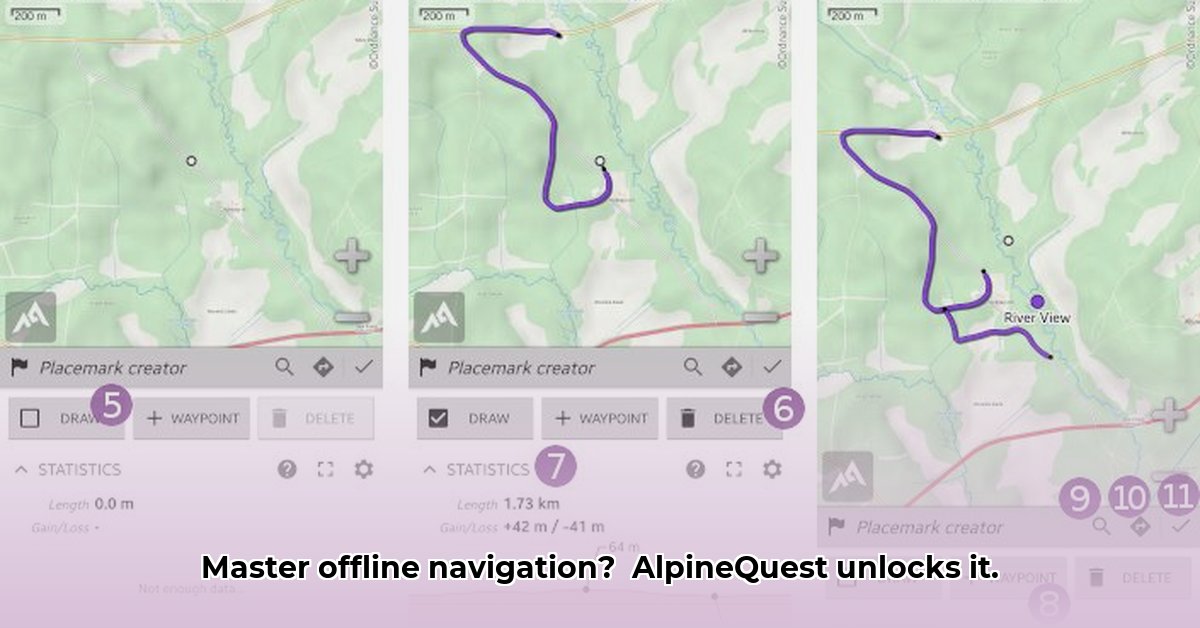
- Creating Routes: Mark waypoints (campsites, viewpoints) and create a route connecting them. This is your digital trail plan.
- Setting Waypoints: Mark crucial locations during your hike. Consider using this to keep track of your route.
- Using the Compass: Ensure correct calibration for accurate bearings, especially in areas with poor visibility.
Troubleshooting Common Issues: Solving Navigation Problems
Let's tackle common problems:
- Weak GPS Signal: Ensure GPS is enabled and there are no obstructions. AQ might offer alternative positioning methods.
- Map Errors: Double-check downloaded maps for correctness and updates. Contact the developers if errors persist.
- App Crashes: Clear the app's cache and check for updates. Reinstalling the app as a last resort may be required.
AlpineQuest: Pros and Cons—A Balanced Perspective
Here’s a balanced assessment:
| Pros | Cons |
|---|---|
| Extensive offline map options | Steep learning curve |
| Comprehensive feature set | Potential device compatibility issues |
| Free version available | Offline map accuracy can vary |
| Robust GPS, compass, route creation tools | Some uncertainty around paid version features |
| Effective waypoint and route management | Lack of clear website vs. Google Play version comparison |
A Quick Look at the Competition
While AQ is a strong contender, competitors like Gaia GPS and OruxMaps are worth considering. Compare features based on your specific needs before selection.
The Verdict: Is AlpineQuest Right for You?
AQ is a powerful tool, ideal for experienced hikers seeking extensive offline navigation capabilities. However, beginners might find the steeper learning curve daunting. The clarity of information around the paid features and version discrepancies would greatly improve its appeal to a wider audience.
How to Use AlpineQuest Offline Maps for Challenging Hikes: Key Takeaways
- AQ excels in offline map navigation, but its interface initially presents a challenge to new users.
- Understanding the difference between online map sources ("maps") and downloaded offline sections ("areas") is critical.
- Waypoints are indispensable for accurate navigation, particularly in areas with unreliable signal.
⭐⭐⭐⭐☆ (4.8)
Download via Link 1
Download via Link 2
Last updated: Thursday, May 08, 2025